LeapFrog Academy™ Learning
LeapFrog Enterprises, IncEducational
3.3396.00 Reviews
- Version
- 1.1.1.1087
- Installs
- 500.00K
- Age Rating
- Everyone
Screenshots
Our Review of LeapFrog Academy™ Learning
 Analysis by Appyee
If you’re on the hunt for a fun and educational app for your little ones, let me tell you about LeapFrog Academy™ Learning. This app is like a virtual classroom packed with interactive games and activities that make learning feel like play. Grab a cup of coffee, and let's dive into what makes this app a hit among parents and kids alike.
Where families may get stuck
Even a cheerful learning game can take a little adult help before a child can settle into it. I’d treat the first visit as a shared activity: stay nearby while your child explores, and notice whether they can follow the on-screen prompts without you explaining each step. A child who can tap confidently but struggles to understand an instruction may need a parent to read or rephrase it. That is different from a problem with the game itself, and it can help you decide whether the activities suit your child’s current reading level.
For a realistic everyday test, try a short session after school or while you are waiting for an appointment. Sit together for the first few minutes, then let your child try the next activity independently. This shows you whether the playful presentation is enough to keep them engaged and whether they can move between activities without frustration. I would not use one distracted session as a verdict: hunger, tiredness, or a noisy room can make any screen activity harder to enjoy.
What’s the Buzz About?
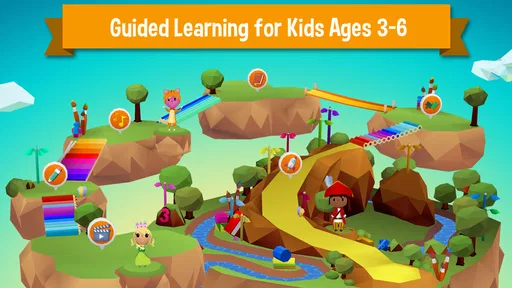
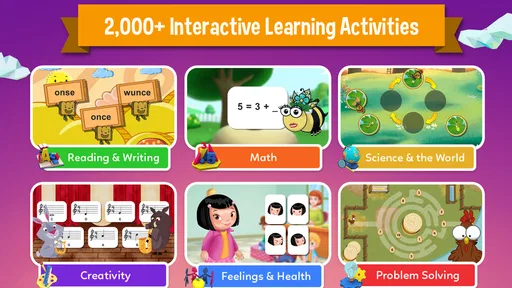
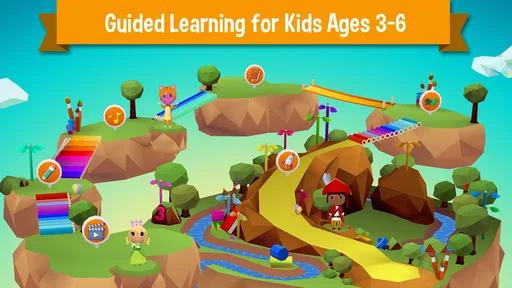
So, what exactly is LeapFrog Academy™ Learning? Imagine a magical world where every corner is filled with exciting quests, puzzles, and challenges designed to engage young minds. This app is tailored for children aged 3 to 6, covering essential skills like math, reading, science, and more. It's not just about ABCs and 123s; it's about sparking curiosity!
Setup checks before a child starts
LeapFrog Academy is a free educational game from LeapFrog Enterprises, Inc., rated for Everyone, with a 3.3 average from around 949 ratings and over 500K installs. The current version is 1.1.1.1087 and it requires Android 5.0 or later. Those details make it worth checking device compatibility before you plan a session, especially if the child will use an older tablet. The game is free to install, but in-app purchases range from $7.99 to $69.99 per item, so I’d look over the purchase options with an adult before handing over the device.
A useful setup habit is to open the game yourself first and check the basic route into an activity. Confirm that the device responds to taps, that the sound level is comfortable, and that your child has a quiet place to focus. If an activity seems confusing, try it together once rather than repeatedly tapping at random; a young child can interpret an unresponsive moment as a sign that they have done something wrong. Keep the first session short enough that you can see what catches their attention without turning setup into a long lesson.
Engaging Content
One of the first things I noticed was how incredibly engaging the content is. The app features a variety of learning adventures. Kids can explore different worlds, each with its own set of challenges. From solving math puzzles to reading interactive storybooks, there's plenty to keep them entertained. Plus, the animated characters are super cute and relatable, which definitely keeps kids coming back for more.
The range of subjects makes this a better fit for a child who enjoys switching between kinds of tasks than for someone looking for one narrowly focused drill. Compared with a basic alphabet or counting app, its broader adventure framing can make practice feel less like repeating flashcards. The trade-off is that a child who wants a very direct lesson on one specific skill may benefit more from a focused activity chosen by a parent or teacher. I’d use the game as a playful supplement, not as a replacement for reading together, hands-on counting, or classroom instruction.
User-Friendly Interface
Let’s talk about usability. The interface is bright, colorful, and easy to navigate. Even young children can find their way around with little to no help. The touch controls are intuitive, and the graphics are vibrant, making the overall experience enjoyable. Plus, there are no complicated menus to get lost in, which is a huge win for both kids and parents.
Still, “easy to navigate” does not mean every child will be comfortable immediately. A preschooler may need a demonstration of what to tap and when to wait for a response. I’d show them one activity, then let them repeat the same kind of action on their own. That small handoff helps distinguish a genuine navigation hurdle from a child who simply has not yet learned the pattern. If they repeatedly ask for help, staying alongside them is more useful than expecting independent use straight away.
Personalized Learning
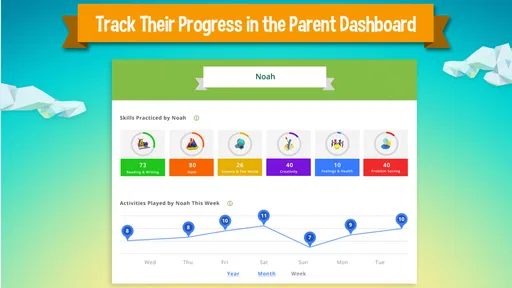
What I really appreciate about this app is its personalized learning path. It adapts to your child’s progress and adjusts the difficulty of the activities accordingly. This means your child is always being challenged just the right amount, which is crucial for effective learning. The app also provides progress reports, so you can see how your child is doing and where they might need a little extra help.
Progress information is most useful when you treat it as a conversation starter rather than a grade. If a child seems to breeze through an activity, ask them to explain what they did; if something is difficult, sit with them and see whether the challenge is the subject, the instructions, or the controls. That gives a parent a more practical picture than simply asking whether the game was fun. I would also avoid using the app’s adaptation as the only measure of learning: children benefit from practicing skills away from a screen, too.
Workflow recovery when a session goes wrong
If a child gets stuck, I’d first pause and look at what is actually happening. Is the activity waiting for a tap, is the child unsure what the prompt means, or has their attention wandered? A calm restart of the current activity is often a better first move than jumping between screens. If the device itself seems unresponsive, close the session and check that it is working normally before inviting the child back. This is general troubleshooting, not a special trick: it helps avoid turning a small interruption into a frustrating struggle.
When you resume, give the child one clear next step instead of taking over the whole task. For example, ask them to listen to the prompt again or point to the part of the screen they think matters. This can reveal whether they remember the goal and gives them a chance to recover independently. If the same point causes trouble more than once, switch to a different activity and return later; persistence is valuable, but a game session should not become a test.
Offline Access
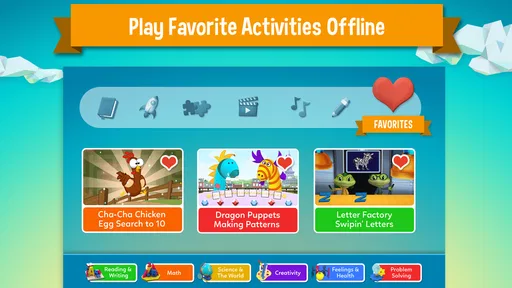
Another cool feature? Offline access! As a parent, I know the importance of keeping kids entertained on the go. Whether you're on a long car ride or waiting for an appointment, you can download content for offline use. This is a lifesaver for keeping kids occupied without worrying about data usage.
For travel, I’d prepare before leaving rather than assume every activity will be ready at the moment you need it. Try the planned content in advance and confirm it opens as expected. That small check can prevent a child from waiting while an adult tries to sort things out in a car or a crowded waiting room. Offline play is handy, but it does not make the game a substitute for a non-screen activity when a child needs a break or the situation calls for looking up from a device.
Safe Environment
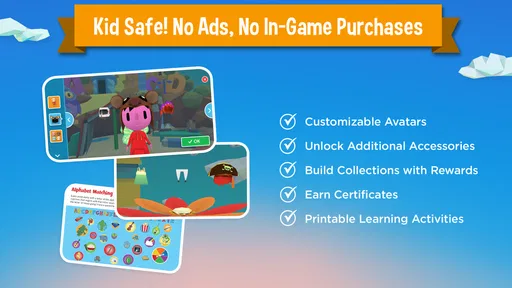
Safety is every parent's priority, and this app gets it right. LeapFrog Academy™ Learning is ad-free, meaning no unexpected pop-ups or inappropriate content. Kids can explore freely without you constantly hovering over their shoulders. It’s a safe space for them to learn independently.
I still recommend keeping the first few sessions within earshot. That is not because a parent needs to direct every tap, but because young children may ask what a prompt means or whether they should continue. Shared use also gives you a chance to decide whether the material and pace feel right for your family. The Everyone age rating is reassuring as a broad content guide, but a parent’s judgment about a particular child’s attention, reading ability, and screen habits remains important.
When another option makes more sense
This is a strong option for families who want one playful place to explore early literacy and math, especially when a child responds better to characters and activities than to worksheets. It is less suitable if you want a completely free experience with no in-app purchases to consider, or if your child is ready for lessons aimed well beyond the preschool range described here. In those cases, a library book, a teacher-recommended resource, or a focused practice app may fit better. The 3.3 average rating is a reason to approach it with realistic expectations and try it with your own child rather than assuming every family will have the same experience.
As a practical routine, I’d offer a brief session at a predictable time, such as while dinner is being prepared, then ask the child what they explored. That gives the game a clear role as one part of a day, rather than an open-ended screen activity. If your child is engaged, you can build on an idea offline: count objects around the room after a math activity, or talk about a story after reading. If they lose interest, there is no need to push through; another kind of play may be the better choice that day.
Subscription Model
Alright, let’s talk cost. The app operates on a subscription model, which might be a deterrent for some. However, considering the vast amount of content and the continuous updates, many parents find it worth the investment. Plus, there’s a free trial period, so you can test it out before committing.
Because the purchase range is broad, I would not treat “free” as meaning that every part of the experience is included at no cost. An adult should review the purchase choices and decide what, if anything, is appropriate before a child uses the device alone. That is a useful habit for any children’s game with in-app purchases. If you are comparing it with a one-time-purchase app or free printable activities, weigh the ongoing cost against how often your child actually returns to it and whether the mix of subjects suits your household.
When the app may not be the cause
Not every disappointing session points to a fault in the game. A child may be tired, distracted, or simply not in the mood for the particular activity. A device that is low on battery, muted, or difficult for small hands to use can also make a lesson feel harder than it is. I’d check the simple things first, then offer another activity or take a break. If the same issue continues across sessions, note when it happens and what the child was trying to do; that makes it easier to decide whether the difficulty is about the device, the task, or the fit for your child.
Overall, LeapFrog Academy™ Learning is a fantastic tool for fostering your child’s love for learning. With its engaging activities, user-friendly interface, and personalized approach, it’s an app that both kids and parents can appreciate. If you’re looking to add some educational fun to your child’s screen time, give it a go. It might just become their new favorite app!
My practical verdict is to try it as a supervised learning companion, then judge it by how your child responds over several ordinary sessions. Its mix of literacy and math activities, adventure-style presentation, and progress information gives parents more to work with than a single-skill drill, while the purchase model and the need to match activities to a young learner are real considerations. For a child who enjoys guided digital play, it may earn a place in the routine; for a family seeking entirely free, narrowly targeted, or older-child material, another option will likely be a better fit.
Verdict
Strengths of LeapFrog Academy™ Learning
- Interactive learning modules engage kids.
- Wide variety of subjects covered.
- Customizable difficulty settings.
- Offline access for on-the-go learning.
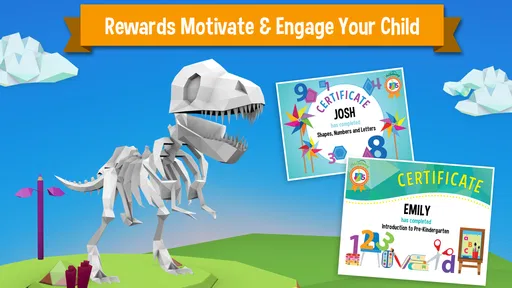
- Rewards system motivates progress.
Limitations of LeapFrog Academy™ Learning
- Subscription required for full access.
- Limited content for older kids.
- In-app purchases can add up.
- Some technical glitches reported.
- Requires adult setup and supervision.
Similar Picks in This Category
View All
Little Panda Policeman
BabyBus4.0

Monster Trucks Game for Kids 2
Raz Games4.1

Little Panda's Chinese Recipes
BabyBus4.4

Little Panda's Restaurant
BabyBus4.4

Little Panda's Ice Cream Games
BabyBus4.3

Baby Panda Care
BabyBus3.8
Frequently Asked Questions
What age group is LeapFrog Academy™ Learning suitable for?
LeapFrog Academy™ Learning is designed for children aged 3 to 6 years old. It offers a wide range of educational games and activities tailored to enhance early childhood learning, covering subjects like math, reading, and science. The app adapts to each child's learning pace, ensuring they receive the appropriate level of challenge.
Is LeapFrog Academy™ Learning available offline?
Yes, LeapFrog Academy™ Learning offers offline access. Once content is downloaded, children can continue their educational journey without needing an internet connection. This feature is particularly useful for families on the go or in areas with limited connectivity, ensuring uninterrupted learning experiences.
What subjects does LeapFrog Academy™ Learning cover?
LeapFrog Academy™ Learning covers a broad range of subjects including math, reading, science, and problem-solving. The app offers over 2,000 learning activities that incorporate interactive games, eBooks, and videos designed to engage young minds and reinforce fundamental educational concepts in a fun, playful manner.
Are there any parental controls in LeapFrog Academy™ Learning?
Yes, LeapFrog Academy™ Learning includes robust parental controls. Parents can track their child's progress, customize learning paths, and control which activities are accessible. This ensures a safe and tailored learning environment, allowing parents to actively participate in their child’s educational journey while setting appropriate boundaries.
Does LeapFrog Academy™ Learning offer a free trial?
LeapFrog Academy™ Learning typically offers a free trial period for new users. This allows parents and children to explore the app’s features and content without initial commitment. After the trial, a subscription is required to continue accessing the full range of educational activities and learning adventures.
Play our best games!


